How Can We Help You?
-
Getting Started
-
Theme Options
-
Meta Options
-
Builders
-
Custom Posts
-
Others
< All Topics
Blog – Listing
To create a unique Blog Post for your entire site you can do it here.
Follow the below steps to create unique blog listing post.
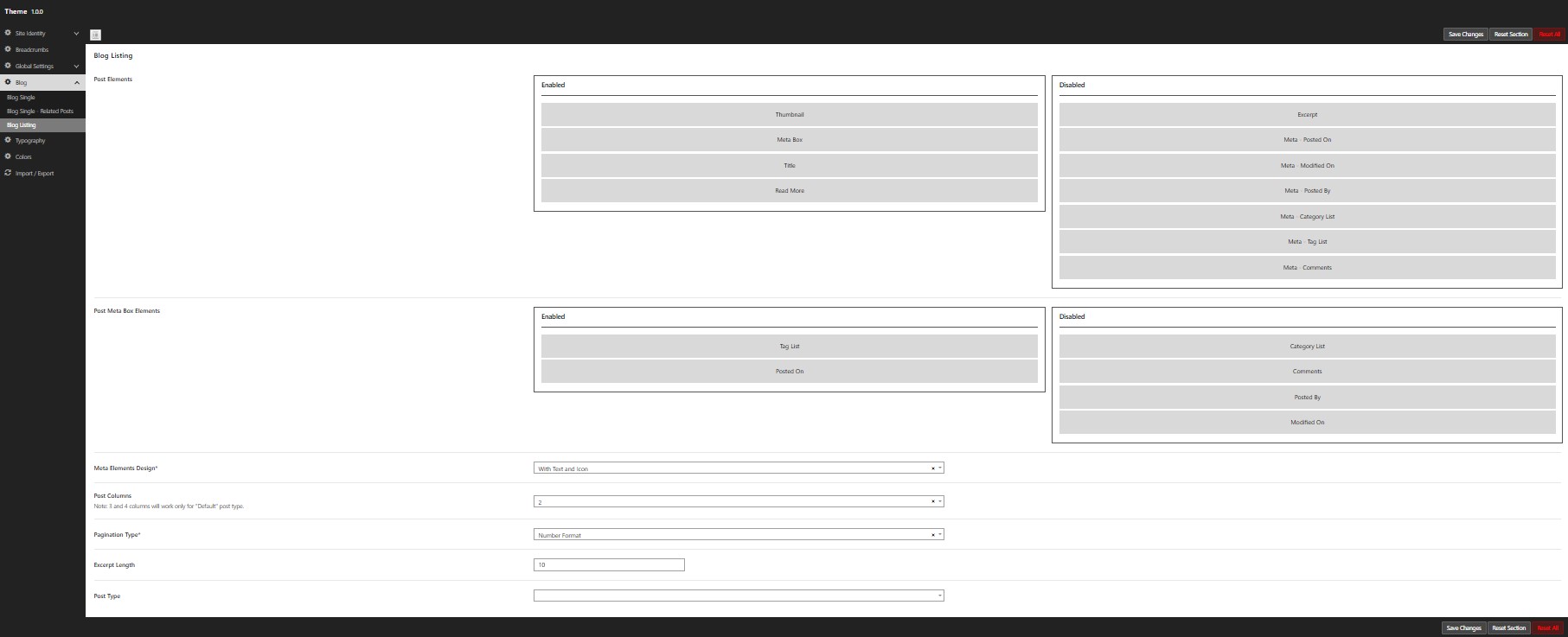
Navigate to WordPress Dashboard -> Nexira -> Theme Options -> Blog -> Blog Listing.
Here you can find
Post Elements, Post Meta Box Elements, Meta Elements Design, Post Per Page & much more…
In Post Elements & Meta Box Elements you can find more blog listing section with Enable & Disable option.
Just drag and drop the section you need to show or hide using Enable / Disable area.
It is possible to rearrange the post elements to create unique blog listing post.
Post Meta Box Elements will get into play only when Meta Box section is enabled on Post Elements.
Meta Elements Design is to show blog meta elements with 3 different content.
Meta Elements Design comes with the option to show content in icon, text & both.
The Post Columns option allows you to control the number of columns displayed on blog listing post.
This Excerpt Length option allows you to control the number of words displayed in the blog listing post.
Pagination Option helps to show the pagination in Text or Numbered format.